.png?width=140&height=37&name=BLAZE-Logo-Blue%20(2).png)
What are Terpenes?
Terpenes are naturally occurring chemical compounds found in plants. They’re responsible for the aromas, flavors, and even colors associated with various types of cannabis.
How do I add them to my products?
-
Navigate to your BLAZE dashboard > products > product list and select the product to which you want to add terpenes.

-
On the product page, click edit and scroll down to the "Terpenoids" section and click "Add Terpenoid" the respective Terpene data. Once all Terpenoids have been entered scroll back to the top of the window, and click save.
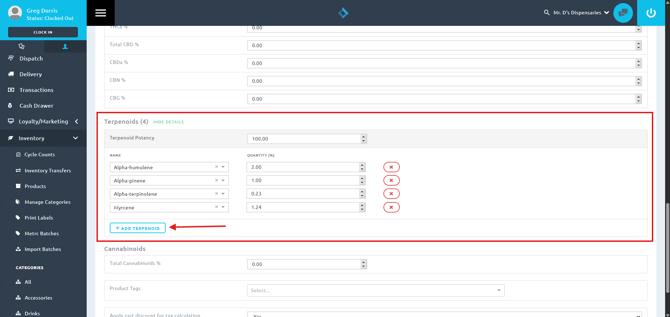
Terpene information can typically located on your products testing COA, or in your track and trace lab results section.
Once these steps have been completed the products with Terpenoid information entered will begin displaying when you re-sync ECOM Mission Control manually, or on the next automated sync. 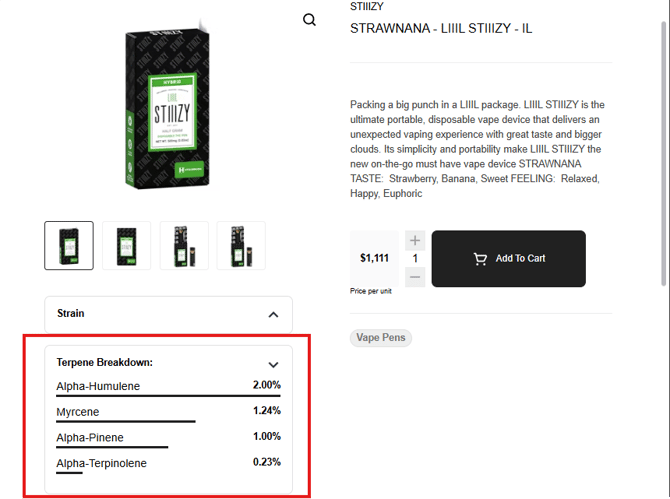
If you have any questions about setting up Terpenoids for your products please reach our to Retail Support team at support@blaze.me