.png?width=140&height=37&name=BLAZE-Logo-Blue%20(2).png)
Overview
To ensure compliance with local regulations for age-restricted products (such as vape, alcohol, and CBD/Hemp), BLAZE R-Series now includes a built-in Age Verification workflow at the Point of Sale. This feature prevents sales to minors by requiring staff to confirm a customer's age before completing a transaction.
Setting Up Your Restrictions
The process begins in your dashboard settings, where you can define exactly which products require oversight.
Category-Based Controls: You can set age limits at the category level. This can be applied globally across all your business locations or overridden for specific stores to account for varying local laws.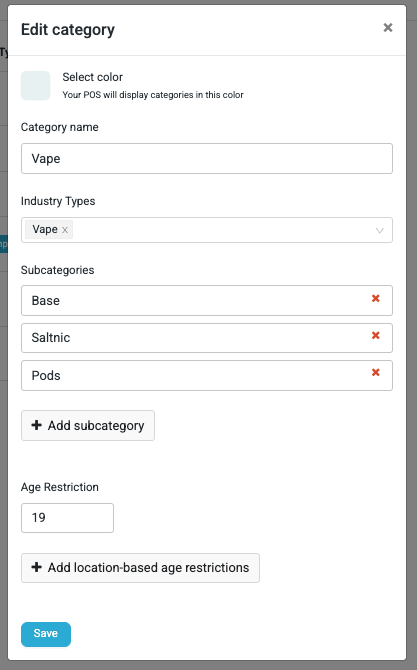
How It Works
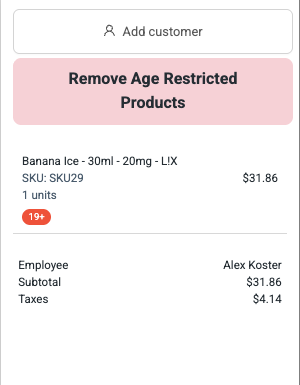
Visual Cues in the POS: Once a restriction is set, the POS provides immediate visibility. Category blocks will display the required age, and restricted items in the cart will feature a specific Age Requirement Badge.
The Age Verification feature is triggered by settings applied at the Category level. When a product from an age-restricted category is added to the cart, the system will automatically initiate a verification prompt during the checkout process.
Verification Workflow
1. Trigger: When a staff member clicks "Charge" at the POS, a verification modal will appear if any items in the cart have age restrictions.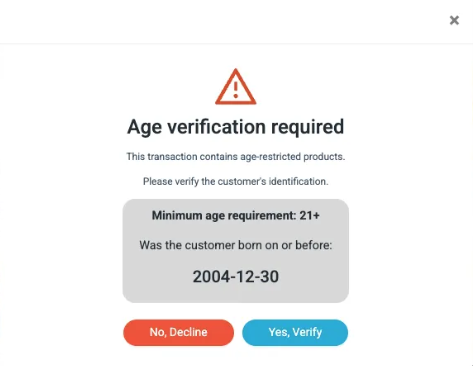
2. Age Calculation: The modal dynamically displays the required birth date (the "Born on or before" date) based on the highest age restriction among the products in the cart.
3. Manual Verification: The staff member must verify the customer's government-issued ID.
-
-
They then select "Yes" or "No" in the modal to confirm if the customer meets the age requirement.
-
Outcomes
Success: If "Yes" is selected, the transaction proceeds to the payment screen, and the verification is logged in the system audit.
Failure: If "No" is selected, a warning message appears, and the age-restricted products must be removed from the cart before the checkout can continue
Key Features
Audit Logging: Every age verification check (success or failure) is recorded for compliance reporting and security audits.
Automatic Prompts: Once enabled on a category, staff do not need to manually trigger the check; it is built directly into the "Charge" workflow to ensure no restricted sale is missed.
Multi-Industry Support: Designed to handle various age requirements across different industries, such as 19+ or 21+.
Setup Instructions
To enable this feature for your store:
-
Navigate to Settings > Categories in your Rsuite dashboard.
-
Select the category you wish to restrict (e.g., "Vape" or "Liquor")
-
Set the Age Restriction value (e.g., 21)
-
Save your changes. The POS will now prompt for verification for all products in that category.